




Liquor Stores Database Updated: 35,944 U.S. Locations
The Liquor Stores Database has a new release. Version 2.0.0 brings together 35,944 screened U.S. liquor-retail locations across the 50 states and District of Columbia. The three packages let you start with location records, then add published contact channels or reported brand relationships when your project needs them.
The directory reflects a September 2026 data snapshot. It is an incomplete selection, not an official license registry or a live guarantee that every listed store is open today. Review the samples and fields before using individual records in a public product or operational decision.
A location base with connected detail
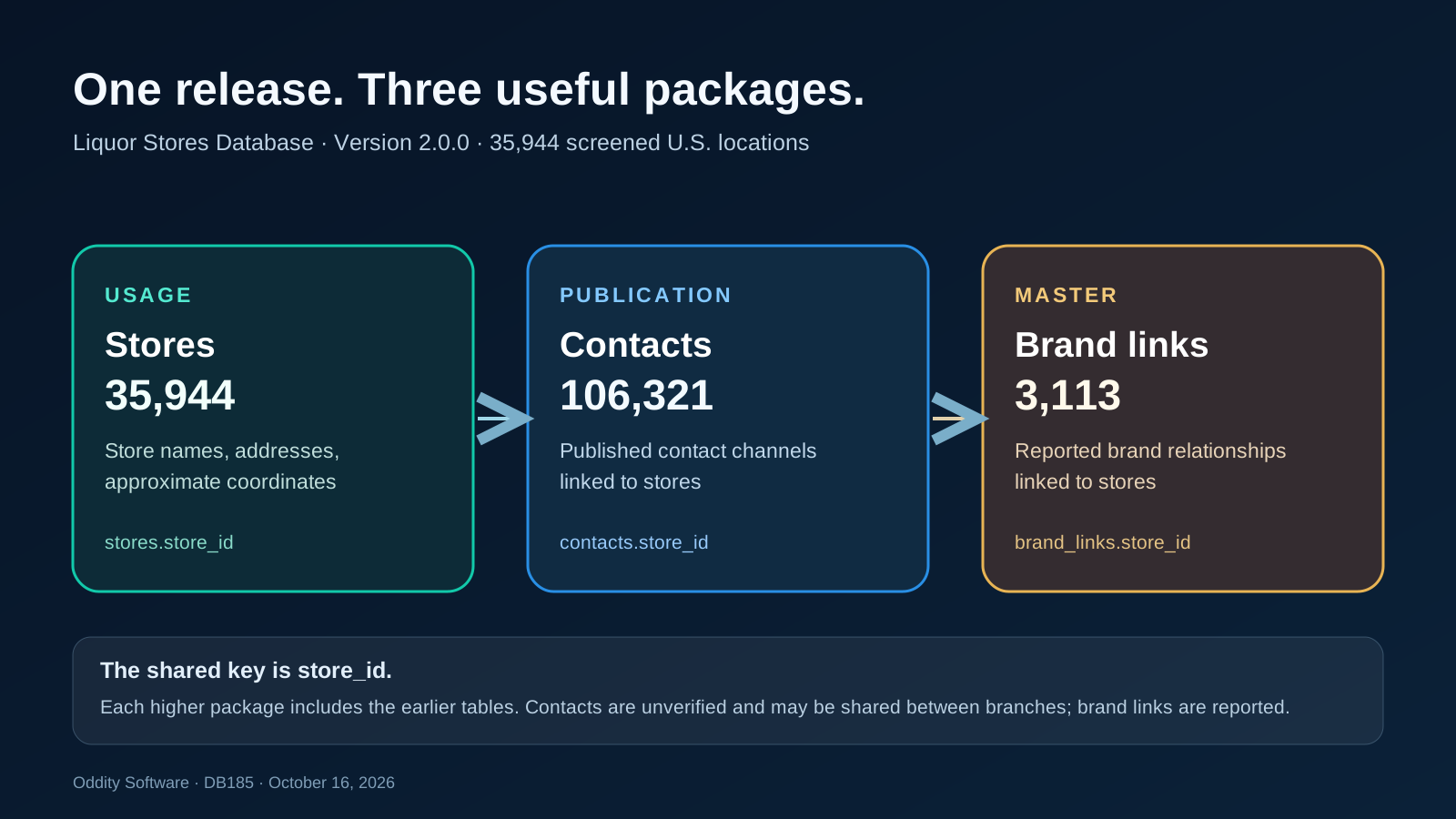
Every package starts with the stores table. It has 35,944 rows with names, address details, approximate coordinates, retail category and reported operating status. The store_id field provides the stable key for joining the additional tables.
Publication adds 106,321 contacts rows with published contact channels and a verification-status field. Master adds 3,113 brand_links rows describing reported brand relationships. Those are child-row counts, not additional store counts. A store may have several related rows. Contact details are unverified and may be shared between branches; a reported brand link does not establish legal ownership.
The package diagram shows how the tiers fit together. Keep the tables separate when you need one row per store, or aggregate child records before joining them into a summary. Joining multiple child tables directly can multiply rows in an export or report.
Pick the package for the job
Usage provides the store locations. It fits internal research, mapping, filtering and applications that need a structured location base.
Publication includes Usage plus published contact channels. It is intended for customer-facing websites, apps, reports and client projects within its license terms, without bulk dataset handoff.
Master includes the lower tiers plus reported brand links. Its license adds dataset handoff within a genuine client project. Standalone dataset resale requires a separate addendum.
The release includes CSV, JSON and SQLite files, along with schemas, samples, statistics and documentation. CSV works well for a quick tabular review, JSON for application pipelines, and SQLite for exploring the joins without setting up a server. Inspect the sample rows and schema before choosing a package, then verify the particular records your use case will surface.
Use the snapshot with its limits in view
This release replaces the older public version with a screened current-source location selection. The count describes this release, not every liquor retailer in the United States. Store details can be incomplete or change after the snapshot. Approximate coordinates should be checked before precise routing, and published contact information is neither a deliverability guarantee nor marketing consent.
Explore the Liquor Stores Database packages to compare Usage, Publication and Master, review the sample data, and choose the detail your project needs.
This announcement describes the October 16, 2026 release. Individual real-world records may change after its documented snapshot.
What the store count actually means
The 35,944 figure counts rows in the stores table. It should not be read as a census of every alcohol license, every grocery that sells beer, or every place where a customer can buy a bottle. This release focuses on screened liquor-retail locations. A business can sell several kinds of products, and a public label or map category can be imperfect. Use the category and status fields as signals for further review when exact classification matters.
Locations span the 50 states and District of Columbia. Coverage is uneven because sources and screening outcomes differ by place. A missing store is not proof that it closed or lacks a license. Conversely, a listed store can change its hours, contact details, name or operating status after the snapshot. The files are a research starting point. For compliance or field operations, check the current official registry and confirm the business directly.
The release documentation names the source vintage and provides a field dictionary so teams can assess fit before joining the data to another system. The sample files are meant to answer practical questions: Are the fields you need present? How are blank values represented? Can your software read the selected format? Does the geographic distribution suit your project? The public table statistics show distinct and missing counts for every published field, making it easier to spot fields that should be treated as optional.
Working with the three tables
If your map needs one marker per location, begin with stores alone. Use store_id as your internal key. When you add contacts, expect a one-to-many relationship: one store can have more than one published contact row. When you add brand_links, expect the same possibility. Count stores from stores, and count contact or brand records from their own tables.
A common mistake is to join contacts and brand_links to stores in a single flat query, then count the resulting rows as locations. Two contacts and three brand links for one location can produce six joined rows. If you need a one-row-per-store report, aggregate each child table first, or query them separately and assemble the display at the application layer. That keeps both the store count and the meaning of each child record clear.
Store names and addresses are useful for matching, but they are not universal identifiers. Names change, branches move and several outlets may share a mailing address or corporate label. The package joins use the release's own store_id. If you match this directory to a CRM, sales territory or external map, review candidate matches before merging accounts or changing operational records. A normalized name and nearby coordinates can narrow a search; neither proves that two records describe the same operating business.
The approximate coordinates help with regional analysis and map previews. They are not a substitute for a verified delivery entrance, curbside pickup point or precise routing destination. Address quality varies. A public-facing map should give users a way to confirm the location and should avoid presenting approximate points as surveyed positions.
Using published contacts responsibly
Publication's contacts table can help a team find a published channel associated with a listed location. It does not certify that a telephone number, email address or website still belongs to that branch. Some contact channels are shared across multiple stores or represent a central office. The verification-status field signals that limitation; it should not be silently converted into a claim that every channel is verified.
Published availability also does not grant marketing consent. Review applicable rules and your own outreach policy before using a contact channel for a campaign. A website can show a contact link where the license permits, but the team should still check that link when accuracy affects its users. If the contact channel is critical to an account record, establish a separate confirmation process and keep the date of that confirmation visible.
Interpreting reported brand links
Master's brand_links table records reported relationships that can support exploratory analysis. They may describe a chain name, banner or other association, and should be labeled as reported. They do not establish legal ownership, franchise status or a commercial agreement. Avoid drawing a corporate hierarchy from a link without corroborating it from a current authoritative source.
Brand relationships are especially easy to overstate in a flattened export. Preserve the relationship wording and its source context when you display or transform these rows. If you build a network diagram, distinguish a reported connection from a confirmed legal relationship in the legend and data model.
Choose a package by the output you need
For an internal analysis that needs locations and fields from stores, Usage is the direct fit. If your project publishes a directory, app or report with the published contact channels, compare Publication's rights and fields. Master adds the reported brand relationship table and broader client-project handoff rights under its license. The tiers are cumulative, but a larger tier is not automatically a better fit if your project does not use its extra information.
Review the exact license before checkout. In particular, determine whether your planned output is an internal tool, a published experience, a client deliverable, or a standalone copy of the data. A client project with a genuine application or report is different from reselling the raw dataset. If your use case crosses that boundary, arrange the appropriate terms instead of assuming a package grants unlimited redistribution.
Existing Master customers may see a version update offer in their account. The offer is tied to their recorded prior-version eligibility. Check the account's current-version offer and its terms before buying; a prior purchase does not mean the new version is already in the old download. The older public release and this v2.0.0 release are distinct snapshots.
A straightforward first pass
Start by opening the field dictionary and sample for the package you are considering. Check the coverage you care about and the missing-value statistics for the fields your project will display. Then download the licensed package and keep its supplied documentation with the data. Load the CSV, JSON or SQLite format that suits your workflow. Build a small test using stores alone, confirm the row count, then add contacts or brand links through store_id only when the output needs them.
When a record will drive a decision, verify it against a current source or the business itself. Record when you checked it. That habit matters more than treating any September 2026 snapshot as a permanent truth. The directory can save discovery and structuring time while still leaving room for the ordinary diligence that real locations and relationships require.
Start a useful discussion below. Your contribution will appear after staff review.