




A clearer picture of U.S. screen printing businesses
DB614 v2.0.0 is a structured reference for researching screen-printing businesses across the United States. The release brings location records, associated contact records, category assignments, and regional summaries into one connected set of files.
The shape of that set matters: the four tables describe different kinds of information, so a count in one table is not automatically a count of unique businesses, people, or geographic areas. This guide walks through the structure, explains how the packages build on one another, and notes what the release can and cannot establish.
What the release contains
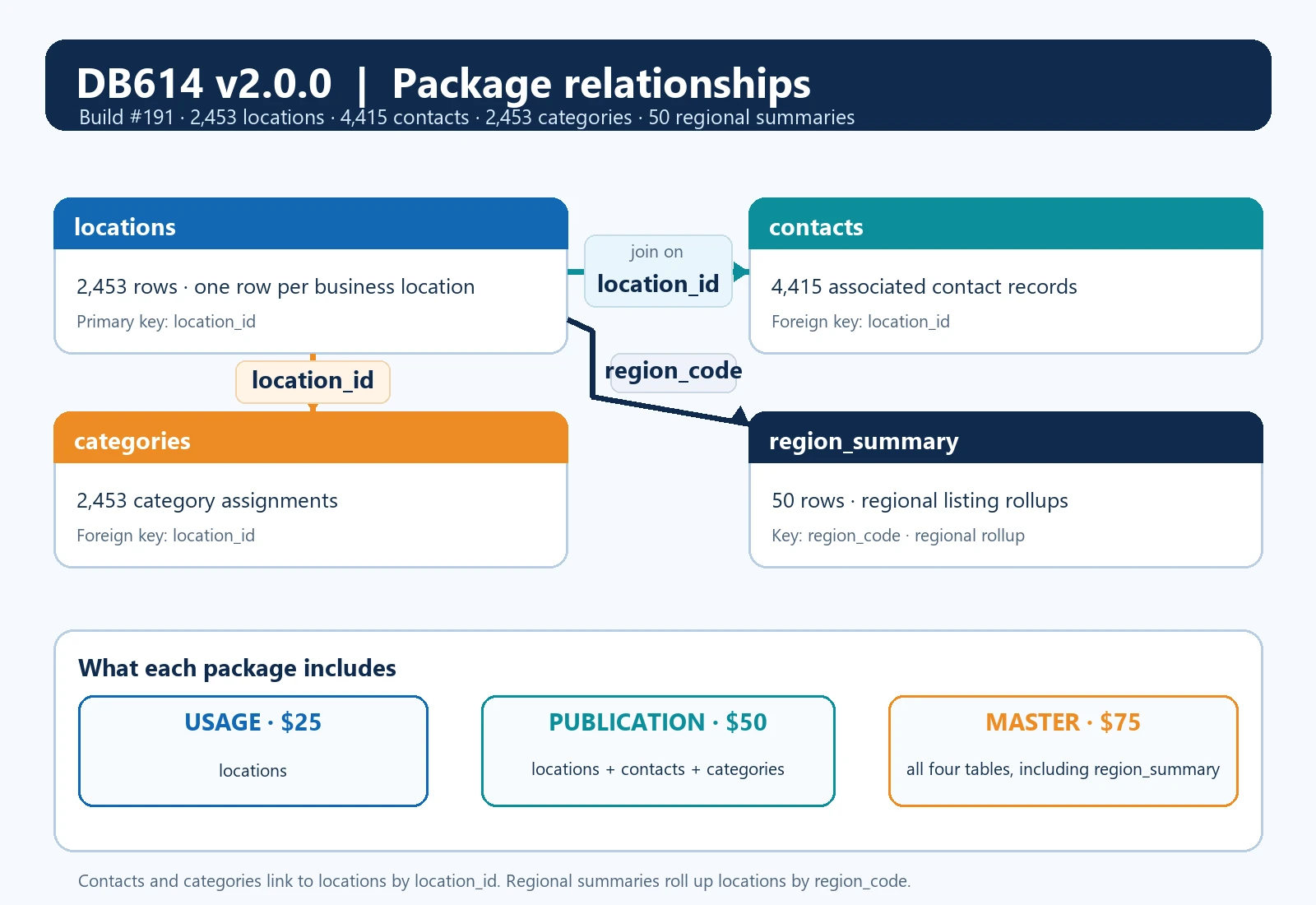
The release is Build #191 and carries the native release date October 27, 2026. It contains 2,453 rows in locations, 4,415 rows in contacts, 2,453 rows in categories, and 50 rows in region_summary. These are table counts. The location table is the natural starting point for a location-based analysis.
Contact and category rows provide related details, while the regional table supplies grouped totals. Adding all four counts together would describe the volume of rows across the files, not the number of businesses or unique locations.
How the four tables connect
Start with locations when you need the core business-location records. Each row has a stable location_id, along with business name and address details, city, region and country codes, coordinates, geographic and reported status fields, source confidence, and snapshot date.
The location_id gives each location row a key that related records can use. If your project begins with a map, a territory list, or a location-level review, this table is the foundation for that work.
The contacts table contains 4,415 associated contact records. Its location_id field links a contact record to a location row. The release distinguishes two contact types, allowing users to separate the kinds of contact information represented in the data.
A business location can be associated with more than one contact record, so the contact count is larger than the locations count. That difference is expected and does not imply that every location has the same number of contacts or that every value is unique.
The categories table contains 2,453 category assignments and uses location_id to connect each assignment to its location. It helps organize the location records by the category information included in the release. Like any linked table, it should be read in relation to its key rather than as a separate count of businesses.
The same location may have supporting records in more than one related table. When you join data, retain the key and check whether the result has one row per location or several rows per location before calculating totals.
The region_summary table contains 50 rows, one for each represented region. It is keyed by region_id and region_code and includes a listing_count for regional rollups. It is a summary table rather than a second set of individual location records.
If you compare it with locations, use the region fields to understand how the summary relates to the underlying location rows. The summary is useful for regional comparisons, but it should not be added to the location count as if it contained additional businesses.
Choosing a package
The three packages expose these tables in steps. Usage, priced at $25 in the current catalog, includes locations. Publication, priced at $50, includes locations, contacts, and categories. Master, priced at $75, includes all four tables, adding region_summary.
The package names refer to rights and included tables as shown on the live product page. The database contents are not a promise that a particular use is permitted. Review the current license terms and the source attribution that accompany your package before using the files in a project.
A practical way to begin is to decide which question your work needs to answer. For a location-focused research list, Usage provides the location table. If related contact records or category assignments are part of the workflow, Publication adds those connected files.
If regional totals are useful for comparison or reporting, Master adds the summary table. The package relationship diagram shows these inclusions visually. It also marks the keys used to connect the tables, so a reader can distinguish a row-level relationship from a summary.
Working with the files
When combining the files, preserve identifiers as text where your software might otherwise alter them, and keep a copy of the original files before transforming them. Join contacts and categories to locations on location_id. Check how many rows the join returns.
A one-to-many relationship can increase row counts even when the number of distinct location_id values stays the same. For a location-level total, count distinct location_id values or return to the locations table. For a contact-level question, count contact rows and describe that unit clearly.
This small check prevents a common mistake: presenting a joined row total as a count of businesses.
Reading the field profile
The release also includes a field profile that describes the values present in the exact Build #191 data. Twelve locations are missing latitude and twelve are missing longitude, which is 0.49 percent for each coordinate field. That means a small portion of location rows cannot be placed with both coordinates from those fields.
It does not mean that every other address has been independently verified or that coordinates should be treated as a legal boundary or precise service-area determination.
The contact field profile reports 4,393 distinct values across 4,415 contact rows. Distinct values are a descriptive statistic. They do not establish that a contact is current, reachable, authorized for a particular communication, or associated with a single current employee. A contact record is research input.
Users should assess freshness and suitability for their own intended use, and should follow the rules that apply to their project. Nothing in the count is a guarantee of response or permission to contact anyone.
Source date and limitations
The source snapshot is Overture Places 2026-09-23.1, with the Overture category taxonomy 2026-09-23.0. Natural Earth data was used for cartographic consistency checks, not to determine legal boundaries. During release population preparation, seven source rows were excluded and two duplicates were removed.
Those figures describe preparation steps for this release. They are not a promise that every source record is complete, nor a measure of ongoing updates after the snapshot date.
A fixed-vintage database is most useful when its date and scope stay visible as the data moves through a workflow. Keep the release version with exported analyses, note whether a result came from locations, contacts, categories, or regional summaries, and preserve the join key in your working copy.
If you combine this release with other data, record the other source and its date as well. These habits help future readers understand what a result measures and which parts came from this release.
The location table includes geographic and reported status information, source confidence, and snapshot details. Those fields describe what was captured and how the source represented it. A reported status field should not be treated as a real-time check.
A business can change after a snapshot, and a dated directory cannot by itself confirm present operations, ownership, staffing, or service availability. For consequential decisions, use the database to organize research and verify important facts with current sources appropriate to the decision.
Before choosing a package
Before choosing a package, compare the included tables with the work you plan to do and inspect the public sample and field statistics on the product page. The sample is a preview, not a substitute for checking the full schema or the version you receive.
The live catalog currently offers v2.0.0 for new purchases at $25 for Usage, $50 for Publication, and $75 for Master. Existing purchases and agreements remain unchanged. The current product page contains the applicable descriptions, terms, and purchase choices.
This release is intended to make the relationships easier to inspect: locations hold the core records; contacts and categories connect back to locations; regional summaries aggregate listings by region.
Once the row units are clear, it becomes easier to select a package, join only the files you need, and describe your findings accurately. DB614 v2.0.0 offers a dated, structured reference for that work, with its scope, table counts, field profile, source vintage, and limitations stated alongside the data.
Explore the exact release, including its samples, field statistics, file options, prices, and terms: View Screen Printers Database product details.
For more help, read What do these listings represent? and Which files are in each tier?.
Start a useful discussion below. Your contribution will appear after staff review.