




U.S. Optometrists Database 2.0.0: Providers, Locations, and Taxonomy
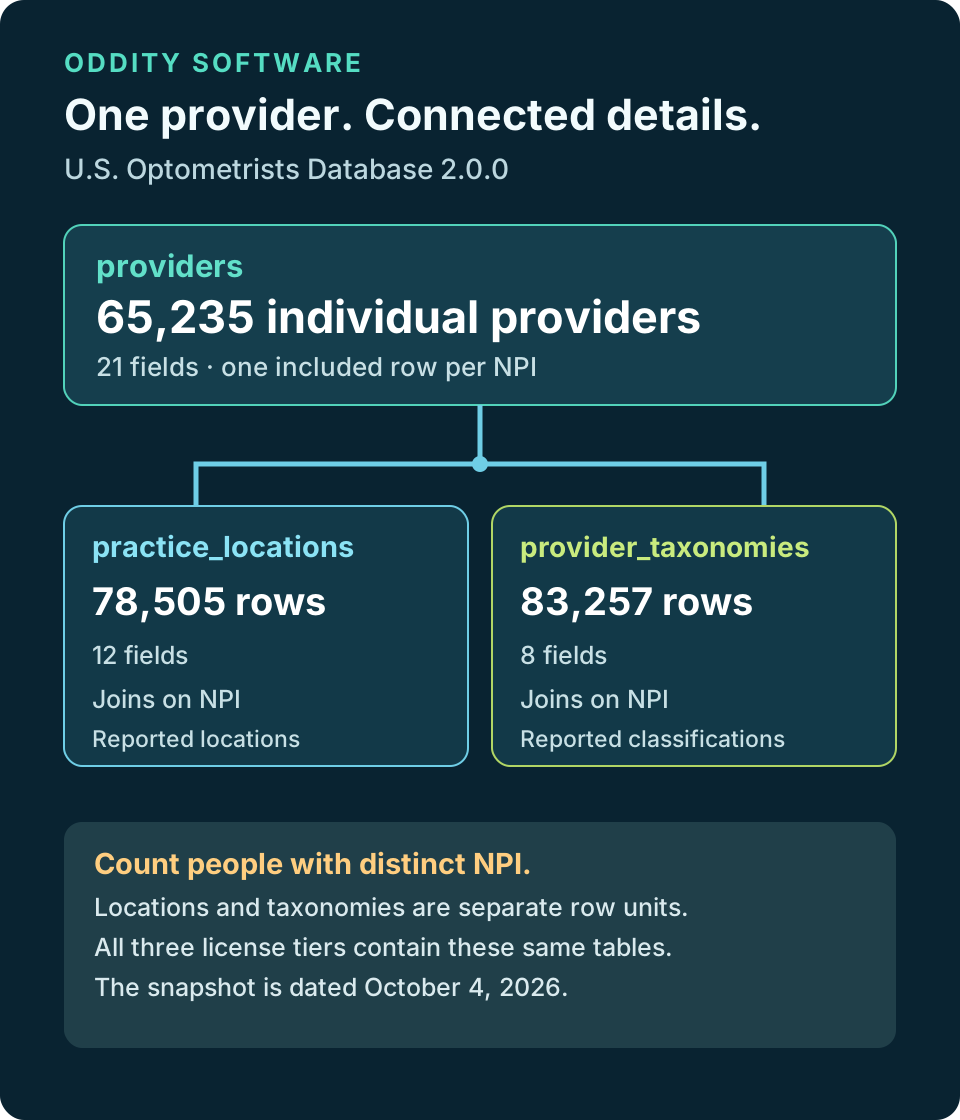
The U.S. Optometrists Database has a new release built around a defined NPPES snapshot. Version 2.0.0 contains 65,235 individual provider records, 78,505 reported practice location rows, and 83,257 provider taxonomy rows. Those are three related tables with different row meanings. A practice location or taxonomy entry is not another optometrist. The release connects them by NPI so that a buyer can examine a provider record alongside the locations and taxonomy information reported for that NPI. The source cutoff is October 4, 2026, using the September 14 monthly NPPES V2 replacement and subsequent weekly V2 increments through that date.
What the provider count means
The providers table has one row for each included individual NPI in this release. Inclusion is based on a reported optometrist taxonomy code in a primary or additional taxonomy slot. It is a useful way to assemble a structured research population, but it does not certify that every person is currently licensed, practicing, accepting patients, or reachable at every listed address. NPPES information is reported by providers and updated on its own schedule. The 65,235 count describes the dated data package, not a live professional registry. Users making clinical, credentialing, or outreach decisions should consult the appropriate primary records and their own current verification process.
Why locations are separate
A single person may report more than one practice location. Keeping locations in their own table prevents an extra address from turning into an extra provider. The practice_locations table contains 78,505 rows and links back to the provider NPI. An analyst can count unique NPIs to study people, count location rows to study reported sites, or join the two for a provider-location view. Those questions have different answers. It is easy to inflate a market estimate accidentally by counting every joined row as a unique professional. The table separation makes that distinction visible rather than hiding it in a flattened spreadsheet.
Reported address is not a status check
A practice address is useful for geographic filtering and routing analysis, yet an address in a source snapshot does not establish that a provider works there today. NPPES can lag real-world changes, and address completeness varies by provider. If a project needs confirmed operating locations, use this dataset as a starting structure and validate the records that matter to the decision. The release does not add inferred coordinates or claim on-site verification. Preserve the source date in downstream reports so a reader understands the observation window, especially if an address is being used to support a current claim.
Taxonomy as a linked dimension
The provider_taxonomies table contains 83,257 rows. It keeps reported codes linked to the individual NPI, including the slot and primary designation needed to interpret a multi-code record. The selection includes the optometrist parent classification and the supported child classifications used by this release. A provider can report more than one taxonomy, so this table can have more rows than the provider table. A taxonomy code describes reported classification in NPPES. It is not proof of specialty certification, active state licensure, or permission to perform a particular service. The delivered source notices and terms apply to the taxonomy code set.
A practical join pattern
Start with providers when the unit of analysis is the person. Join practice_locations on NPI when a project needs reported locations, and join provider_taxonomies on NPI when it needs classifications. Joining both child tables at once can multiply rows when one provider has several locations and several taxonomy entries. To avoid misleading counts, aggregate each child table first or use a distinct provider key for person-level measures. Keep row-level results when the question genuinely concerns every combination, but label that grain. The package includes field descriptions and samples so teams can inspect the actual keys and column meanings before building an import or query.
Three tables, forty-one fields
Across the three tables, version 2.0.0 exposes 41 fields: 21 on providers, 12 on practice_locations, and 8 on provider_taxonomies. The public sales page provides a table and field profile with Distinct and Missing figures measured from the full signed release. Missing includes both null values and blank strings where applicable. Those statistics help a buyer decide whether a field is suitable for a particular workflow. A field with gaps may still be useful for filtering or enrichment, but a buyer should not assume every record carries every attribute. The sample view illustrates the shape; the full-release profile is the basis for the displayed statistics.
What changed in this update
This is a rebuilt relational release with a dated current-source population and explicit linked tables. The prior public catalog version was 1.0.9. Version 2.0.0 should be read as a new current release, not a promise that every former listing still appears or that an older field was automatically carried forward. Older Oddity material was reviewed as private continuity evidence. The signed version 2.0.0 customer release uses the current verified source set; unmatched aged listings were not included to inflate the public count.
How to use the package responsibly
The dataset can support research, internal directory work, geographic analysis, and applications that need a structured optometrist starting point. It should be combined with a sensible validation plan when conclusions depend on current license status, identity, practice status, or outreach suitability. An NPI establishes an identifier in NPPES, not the outcome of those separate checks. Contact rules and professional obligations may also differ by use. A careful workflow records the snapshot date, tracks any subsequent corrections, and avoids describing an unverified field as a verified fact. These limits are ordinary consequences of working with a dated public administrative source.
Formats and delivery
The release is delivered as a protected ZIP for the selected license tier. The three tier bundles contain the same versioned data shape and differ in the rights granted by their agreements. A buyer should choose the tier based on the intended use, not assume a higher-priced tier contains more optometrists. After purchase or an authorized support issuance, the customer portal presents the applicable current release. Protected delivery ties the file to the customer's entitlement. The current release, tables, field profiles, and sample are described on the product page before a buyer selects a tier.
Choosing usage rights
Usage is intended for internal organizational use. Publication adds permitted customer-facing uses such as sites, applications, reports, and services, subject to the agreement's limits on raw or substantially reconstructable data handoff. Master adds the specified client-engagement handoff rights for raw or transformed data; it does not turn the package into a standalone resale license. The current public offers are Usage $40, Publication $80, and Master $160. An eligible owner of a prior Master version may see a separate $10 current-version update offer in the customer portal. Eligibility is account-specific, and that offer is not a public sale of an older download.
Source notices travel with the data
The package uses CMS NPPES information and the NUCC Health Care Provider Taxonomy Code Set under their applicable notices and terms. Taxonomy material carries AMA attribution and limits on alteration and endorsement claims. Neither CMS nor the AMA or NUCC endorses Oddity or a buyer's use of this product. Buyers should keep the included notices with copies and review the selected agreement before incorporating the data into a public product or client work. The package does not convert provider-reported classification into official credential verification. These boundaries matter most when data leaves an internal research setting.
Starting points for a new project
A useful first step is to decide what one row should represent in the final system. For a list of professionals, begin with providers and preserve NPI as the key. For a map or regional inventory, work with reported locations and make it clear that multiple sites may connect to one person. For specialty-oriented filtering, examine all reported taxonomy rows and the primary designation rather than assuming a single code per NPI. Review the full-release missingness figures for fields that drive the application. Then test a small import and inspect a few multi-location and multi-taxonomy cases before producing totals.
Where to inspect the release
The current product page shows the exact version, three table counts, field profiles, samples, available formats, and tier choices. The Help Library has separate guides for coverage and records, joining and importing, and rights and downloads. Together, those materials explain the package structure and the important limits without asking a buyer to infer them from a ZIP name. Version 2.0.0 is a dated snapshot through October 4, 2026. Review the live product page for the full field profiles and license choices, and confirm individual records against current primary sources when a decision needs current facts.
Start a useful discussion below. Your contribution will appear after staff review.