




Pizza Shops Database 2.0.0: 102,819 U.S. Locations and Connected Business Details
A pizza shop can be a neighborhood fixture, one branch of a chain, a takeout counter or a restaurant with a broader menu. Turning those locations into a useful research resource takes more than collecting names. You need a clear geographic scope, consistent fields and a way to keep several contact details attached to the correct place.
The Pizza Shops Database 2.0.0 brings together 102,819 listed locations in the United States, including Puerto Rico. Released October 21, 2026, this edition provides a location table and, depending on the license package, related contact and social-profile tables. CSV, JSON and SQLite files let you start in a spreadsheet or import the same structure into an application.
A location directory with a defined scope
The location count describes listed places, not verified unique legal companies. Several branches can belong to one business, and the directory is not a complete census of every pizzeria. Canada is outside this release's scope. The underlying current location snapshot is from September 2026, so the October release date should not be read as a same-day verification of every business detail.
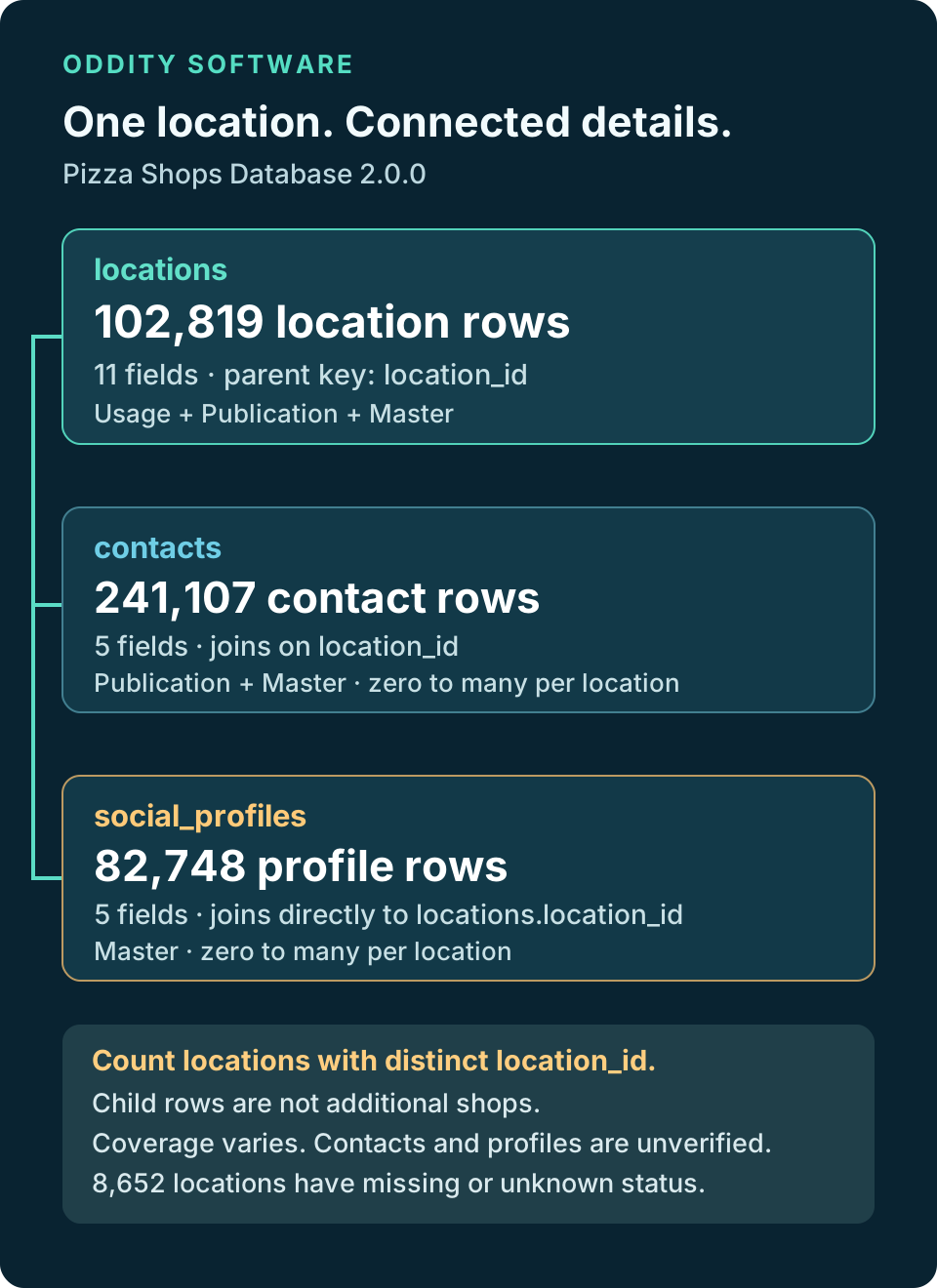
Known permanently closed locations are excluded. Of the released locations, 94,167 have reported open status and 8,652 have missing or unknown operating status. A reported open value describes general operation in the dated data; it does not establish current opening hours or prove that the business is trading today. The separate operating_status_unknown field makes uncertainty visible when filtering.
Three related tables, with a clear unit for each row
The locations table contains 102,819 rows and 11 fields: a location identifier, business name, street address, city, state code, postal code, country code, approximate latitude and longitude, operating status and its unknown-status flag. Addresses and coordinates can be incomplete or inaccurate, so check them before dispatching staff, publishing a map or making a location-specific decision.
The contacts table contains 241,107 rows and five fields. Each row describes a contact value associated with a location, such as a phone number, email address or website. Its contact_id identifies that contact row, while location_id connects it to the location table. These are contact records, not 241,107 additional shops, unique people or verified email addresses.
The social_profiles table contains 82,748 rows and five fields. Each row supplies a profile identifier, location identifier, platform, profile URL and verification status. A location can have several profiles or none. Profile rows therefore should not be added to the location count or treated as evidence that every shop has a social account.
Join related details without multiplying your shop count
Start with locations when counting shops or building a geographic selection. If your package includes contacts, select the contact types you need and join on location_id. A left join preserves locations without a matching contact. An inner join deliberately restricts the result to locations with the selected related data.
Joining both child tables at once can produce several result rows for one location. A shop with three contact rows and two social profiles can become six joined rows. Aggregate each child table first, or count distinct location identifiers, when the question concerns locations. Keep the original tables available so you can inspect a result rather than relying on a flattened export alone.
Choose the package and rights for your project
- Usage, $50: the locations table for internal work within one organization, including supervised contractors.
- Publication, $100: locations plus contacts, with Usage rights and customer-facing websites, apps, reports and client projects without bulk dataset handoff.
- Master, $200: all three tables, with Publication rights and raw or transformed dataset handoff within a genuine client project. Standalone dataset resale requires a separate addendum.
The packages are cumulative in table coverage, but their permitted uses also differ. Review the complete applicable agreement on the product page before choosing. Eligible earlier Master purchases currently have a $12.50 update offer, checked against the account and release. Buying a version does not promise every future edition at no cost.
Practical ways to use the structure
For territory planning, filter locations by state or city, inspect missing geography and verify a shortlist before drawing commercial conclusions. For a directory or mapping application, choose the publication rights your output requires and provide a way to correct business information. For an internal research system, retain the location key so that related details can be refreshed or reviewed without confusing a contact row with a business location.
CSV is a convenient starting point for inspecting one table. JSON supports application imports, while SQLite keeps related tables together for local queries. The release also includes schemas, statistics, representative samples and documentation. The public page exposes table-specific samples and measured Distinct and Missing values, so you can inspect the structure and completeness before purchasing.
Check the limits before relying on a result
Contact and social-profile values are unverified. Their presence does not establish deliverability, ownership, marketing consent or permission to contact someone. Missing values and unknown status remain meaningful limitations. Verify details independently and use the data within the applicable license and your own lawful purpose.
The Pizza Shops Database Help guides explain the delivered files and relationships. The product page provides the current package comparison, samples and field statistics for this version.
A first import that keeps the structure useful
Begin by opening the samples for each table you intend to use. Check the headings, text encoding and representative values against the system receiving the data. Treat identifiers, postal codes and phone values as text where appropriate. A spreadsheet that automatically converts them to numbers can remove leading zeros or change their presentation before you notice.
Import the location table first and keep its identifier as the parent key. Then import any included contact and social-profile tables, retaining their own row identifiers and the shared location key. Before combining the tables, compare the imported row totals with the release documentation. A filter, incomplete import or accidental duplicate load can otherwise produce a plausible-looking result with the wrong population.
For a basic regional shortlist, choose a city or state and review the resulting locations before enriching them. Keep unknown operating status visible instead of silently treating it as open. When an address is incomplete, preserve that limitation in your project rather than filling the gap with a guess. Approximate coordinates can help with exploration, but they should not be used as a verified delivery entrance or exact property boundary.
When adding contact values, decide whether the output needs one selected value per type, a list of all related values or separate child records. That choice affects the shape of the result. It is often easier to keep a phone list or website list related to one location than to copy the location into several rows and later try to deduplicate it.
Read completeness alongside coverage
A large location total cannot tell you whether a particular field suits your project. Inspect the public field statistics and the sample for the column that matters to you. Missing counts include null and blank values; a populated field can still contain an outdated or unverified fact. Distinct values describe the stored data, not an independent verification of businesses, ownership or identity.
Use these checks to decide whether the directory is a useful starting point for your task. A market overview, an internal shortlist and a public application have different requirements. If your work needs a specific completeness target or a narrower geography, discuss that requirement before choosing a package. The best fit is the one whose fields, limits and license match the output you intend to build.
Start a useful discussion below. Your contribution will appear after staff review.