





Find the drink, then find what goes in it
A drink name is a good starting point. It is a poor filing system. Ask three people for a familiar cocktail and you may get three different formulas, each with its own proportions, garnish, glass, and story. That variety is part of the fun when you are standing at the bar. It becomes harder to manage when you want to search a collection, build a menu, compare formulas, or make a list of what to buy.
The updated Drinks and Cocktails Database gives that work a structure. Version 2.0.0 contains 16,893 recipe records and 66,281 linked ingredient rows. You can explore the data in CSV, JSON, or SQLite, depending on whether your starting point is a spreadsheet, an application, or a query. The point is to spend less time retyping recipes and more time asking useful questions of them.
Start with the question you want answered
Perhaps you have grapefruit, rye, and a bottle of bitters on hand. Which drinks in the collection mention those ingredients? Perhaps you are designing a seasonal menu and want to compare several takes on a sour before choosing one to test. Or perhaps you are building a recipe site and need a dependable way to show a drink beside its ingredient list. A collection becomes useful when the fields and relationships let you move from those questions to a short list of records you can inspect.
You can search drink names and categories, examine the text of instructions, or filter ingredient rows. Those approaches answer different questions. Searching a recipe title finds a named drink; searching the linked ingredient table finds formulas that contain a particular ingredient even when the name offers no clue. A simple spreadsheet filter can be enough for a small exploration. A database query becomes handy when you want to combine several conditions or repeat the same search often.
Do not assume that matching names mean identical formulas. Recipe names are human labels, and the same label can travel through different sources and traditions. Keep the individual recipe ID in view when you compare or display results. It lets you follow one specific record through the rest of the data.
One recipe, several ingredient rows
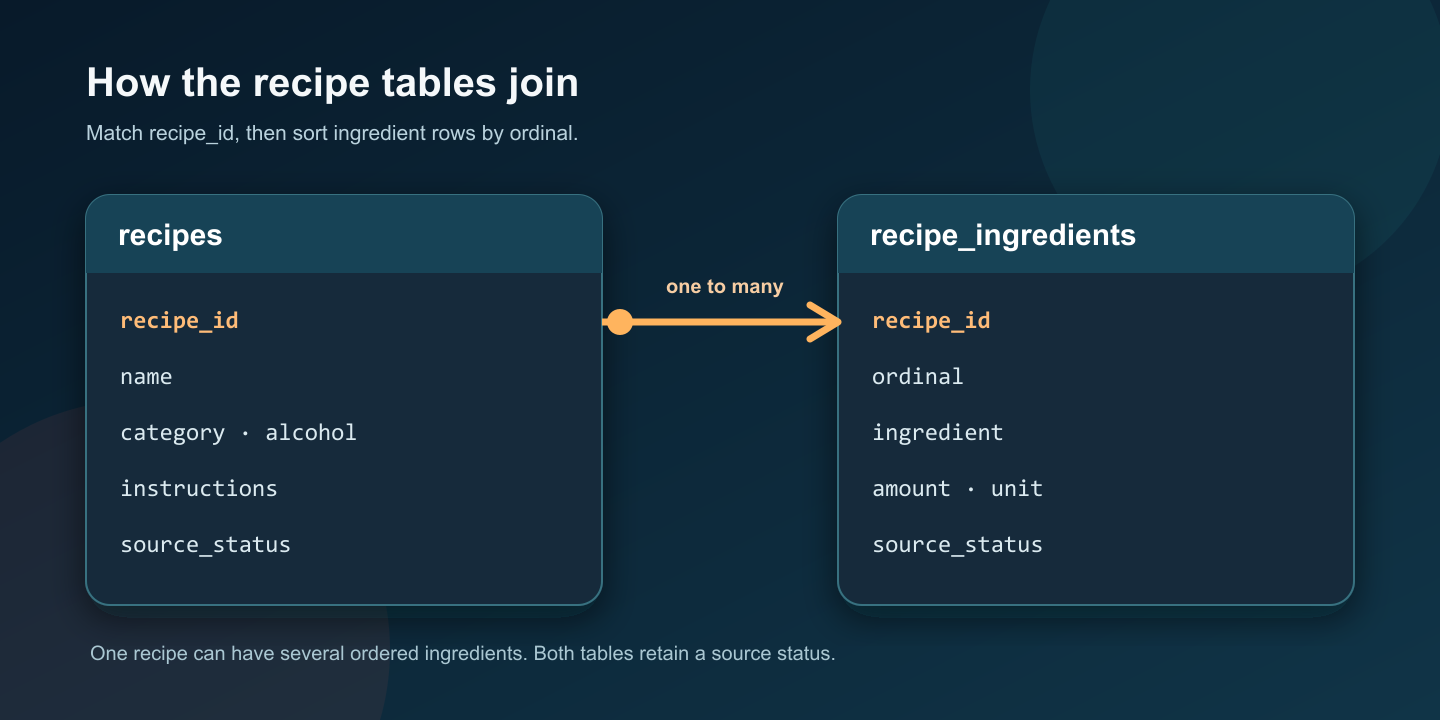
The release has a recipes table and a recipe_ingredients table. Each recipe has a stable recipe_id; every linked ingredient row carries that same ID. The ingredient table also has an ordinal field. Join the tables on recipe_id and order ingredient rows by ordinal to reconstruct the ingredient sequence associated with a recipe.
That relationship matters because an ingredient list is more than an undifferentiated blob of text. With separate rows, you can look for every recipe that uses a particular ingredient, group results by ingredient, or assemble a shopping list from the recipes you select. You can still display a familiar readable recipe. The structured rows give you another way to work with the same information.
For example, a menu tool could show a drink's name and instructions from recipes, then load its ordered ingredients from recipe_ingredients. A shopping tool could take a set of selected recipe IDs and collect the associated ingredient names. A comparison view could place two formulas side by side so you can see where a shared name hides a different spirit, mixer, garnish, or quantity. These are ordinary data operations, and the linked layout makes them practical.
The release also includes an ingredients_text field in the recipe table for a readable original-style list. That field is useful for quick inspection. The linked rows are the better starting point when you need to filter or group ingredients. Keep both representations available until you know which one suits your project.
Handle quantities as written
Recipes are not all equally precise. Some specify an amount and unit; others name an ingredient without a reliable quantity. The database keeps amount and unit fields as provided. A blank amount does not mean zero, and it should not be silently converted into a guessed measurement. When your application displays an incomplete formula, show the gap clearly or send the record to a review queue.
That matters especially if the data will influence a real menu. Before serving or publishing a drink, check its ingredients and preparation against a dependable recipe reference and your own standards. Verify quantities, allergens, alcohol content, and serving directions. A searchable collection can reveal candidates quickly; a human still needs to decide what is safe and suitable to make.
You may also see different naming conventions for the same broad ingredient. A source might say "lime juice" while another says "fresh lime juice." Treat that as a data-cleaning choice for your own application, not as permission to rewrite the original recipe without review. You can add a normalized search label alongside the supplied text while retaining the source wording for traceability.
Read the status alongside the recipe
The collection combines 16,351 historical Oddity recipe records with 542 licensed additions. Historical records are labeled historical_unverified, and the additions carry a licensed_source_snapshot status. These labels help you understand the release population. They do not promise that every individual drink was invented, last checked, or popular on the date the collection was assembled.
The distinction is useful when you decide what to review first. A historical formula may be a good lead for comparison or creative exploration while still needing fresh verification before publication. A source snapshot tells you when that source was captured; it does not certify an individual preparation as current. You can filter or display status and vintage fields in your own project so that an older entry is not mistaken for a newly checked one.
No structured collection removes judgment. In this one, the status fields make that judgment easier to apply. If you are assembling a private research list, you might keep a broader set of candidates. If you are publishing instructions for an audience, you can require an additional check on each chosen recipe. If you are running a venue, you can add your own tested measurements, supplier substitutions, and service notes without overwriting the original record.
A few practical ways to use it
A searchable menu is the most obvious example, but it is not the only one. You could make a small "what can I make?" tool that starts with ingredients already on a shelf. You could use category fields to browse drinks and ingredient rows to narrow the list. You could compare variants before a tasting session or assemble a shopping list for a planned set of recipes. You could also study the collection itself: which ingredients appear most often, where quantities are missing, and how many records need review before a particular public use.
Each project calls for a different amount of cleanup. A private spreadsheet may only need filters. A customer-facing app may need normalized ingredient names, clear source-status display, accessible recipe layouts, and a review process for incomplete instructions. The supplied CSV, JSON, and SQLite formats make it possible to choose the amount of structure that fits the work instead of rebuilding the collection from scratch.
The important connection is simple: the recipe record identifies the drink, and its ingredient rows describe what goes into it. Once you can reliably join those two parts, you can build a useful view of the collection without relying on the drink name alone.
Preview the actual data
The product page includes recipe and ingredient samples, a field-level statistics view, the current version, and license choices. Open both samples before choosing a format. Look at the column names and a few real rows, then decide how you would join the tables and handle incomplete quantities in your own project. The statistics view shows distinct and missing values for each published field, including blank strings, so you can gauge how much cleanup your intended use may require.
If the structure fits, choose the license for your intended use and work from the protected release files. If you are still deciding, the samples and statistics are a useful place to start. A good drink may begin with a name, but a useful recipe project begins with knowing exactly what is in the glass and how the data connects.
Start a useful discussion below. Your contribution will appear after staff review.