





Golf Courses and Golf Resorts Database 2.0.1: Four Tables for Course Research
A golf course record can answer a simple question: where is the course? For research and planning, the next questions are usually more useful. What kind of facility is it? Which contact routes are available? What amenities or other course attributes are recorded? Can the information be filtered and mapped without rebuilding it from scattered pages? The Golf Courses and Golf Resorts Database 2.0.1 is organized to support those questions.
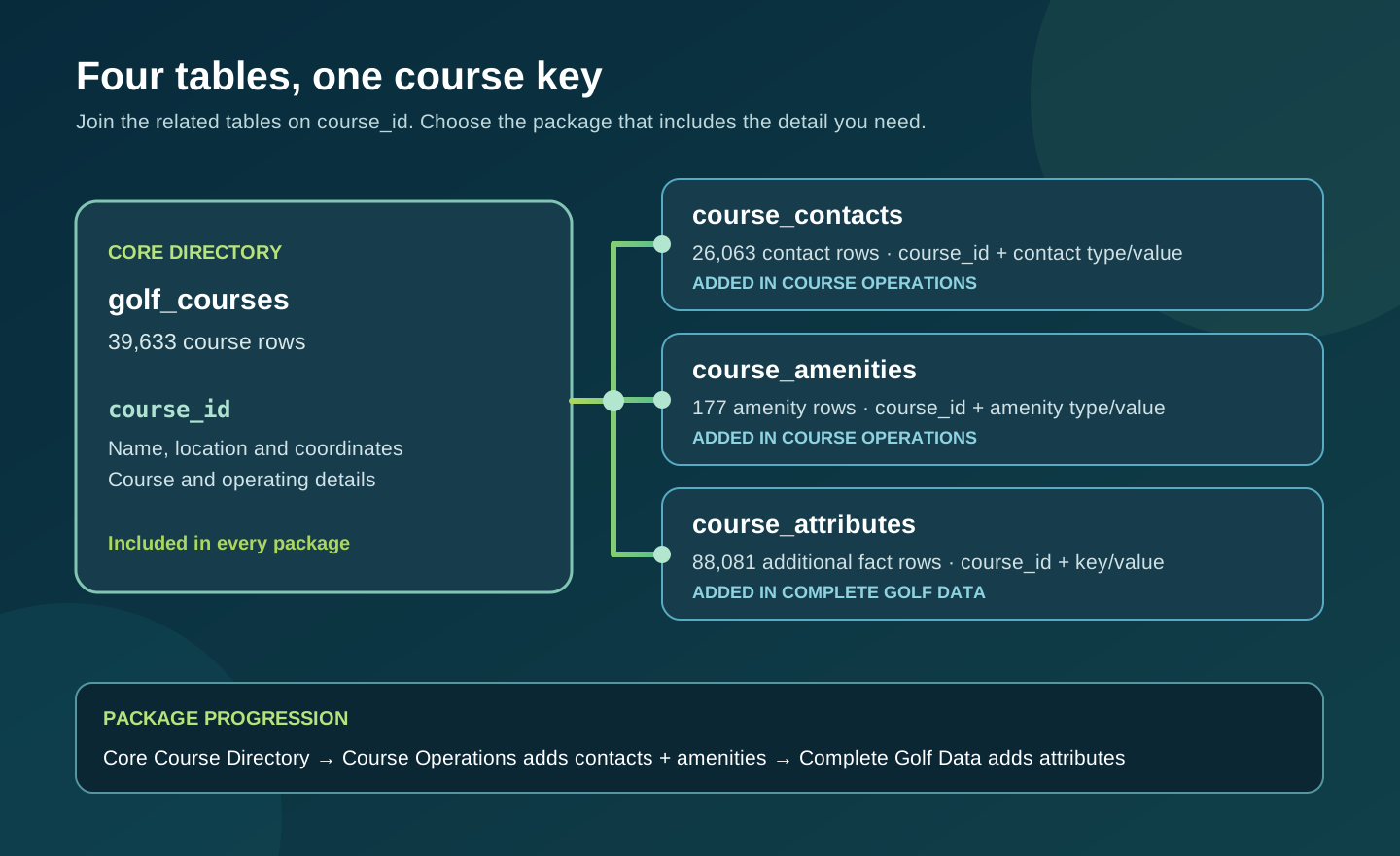
The current release contains 39,633 golf-course records. It also includes 26,063 contact rows, 177 amenity rows, and 88,081 additional attribute rows. Those numbers describe rows in four related tables, not four separate populations of golf courses. A course is the starting point. The other tables add details where the release has them. On the product page, you can inspect samples and field-level statistics before choosing a license.
Start with the course directory
The core golf_courses table gives each listed course a stable course ID and fields for its name and location. This structure is useful whether you are building a map, comparing facilities in a region, maintaining an internal research list, or adding a golf category to a directory. You can sort and filter the rows, join additional details, and preserve the ID as the reference for later updates in your own system.
For a mapping project, begin by opening the course sample and checking the location fields that matter to you. A course name alone may be ambiguous. A location, country code, and coordinates can help distinguish similarly named facilities, but each project should decide how to handle incomplete or uncertain positions. The public statistics view shows distinct and missing counts for each published field, so you can estimate how much review your intended geography requires.
For a market or hospitality project, the directory can establish the set of facilities you want to study. Filter by the geography or classification available in the data, then add your own research, visit history, or account notes in separate columns. Keeping your own observations apart from supplied fields makes later reconciliation easier. It also lets you revise a field without losing the original release value.
Add contact and amenity details where available
The course_contacts table contains 26,063 rows. It gives you contact channels associated with listed courses, such as phone or web details where present. It is a separate table because a course can have more than one contact value, while another course may have none. Join it to the course directory using the course identifier, and inspect the contact type before displaying or using a value. The row count is a count of contact records, not a guarantee of one contact for every course.
The course_amenities table contains 177 recorded amenity statements. That is a narrower layer of information. It may help identify features of particular facilities, but it should not be treated as a complete amenity survey for all 39,633 courses. If your application includes an amenity filter, distinguish a recorded value from a missing one. Absence of an amenity row does not prove that a facility lacks that feature.
The additional course_attributes table contains 88,081 rows of other structured facts. This layout can accommodate several facts for one course without forcing a large set of mostly empty columns into the core directory. Inspect the attribute names and values in the sample before designing filters or import mappings. Some projects will use a small group of fields, while others will need to pivot or index several attributes for repeated queries.
Choose the package for the work
The three purchase options contain different sets of tables. Core Course Directory includes the 39,633-row golf_courses table. Course Operations adds the 26,063 contact rows and 177 amenity rows. Complete Golf Data adds the 88,081 course attribute rows. The product page identifies the exact files and the corresponding license rights. The packages are delivered in CSV and SQLite formats, with supporting schema and release documentation. Compare the tier cards and samples to the operations your project actually needs.
A simple regional map or internal facility list may begin with the directory. A customer-facing directory that needs contact channels may need the middle package and its permitted publication rights. A project that requires the complete set of additional structured course facts may need the full package. The rights and the data contents both matter. Read the applicable license terms before you build an external product or transfer a dataset to a client.
Choose an import path that matches your team. CSV is convenient for a spreadsheet or a straightforward import. SQLite lets an application query and join the related tables locally. Keep the course ID as the common reference when you bring in contacts, amenities, or attributes. If you export a flattened view for a map or report, remember that a course with multiple related rows can appear more than once unless you aggregate the extra details deliberately.
Use the statistics before you commit to a workflow
A total row count does not tell you whether a particular field is complete enough for your use. The sales page includes a switchable statistics view for all four tables, showing field names, types, distinct values, and missing values. Missing includes blanks where measured. Open each table tab rather than judging the whole product from the headline course count. A contact-dependent campaign, for example, should inspect contact types and their available values, not assume every course has a phone number.
The samples let you examine real structure before purchase. Review course names, geography, contact types, amenity labels, and attributes as applicable. Look for the data types and join keys your system expects. A few sample rows cannot establish overall completeness, so use the field statistics alongside them. The two views answer different questions: the sample shows how a row looks; the statistics show how broadly a field is populated.
Country and location classifications deserve particular care. The current release represents many country-code values, and the page shows leading groups. That is useful for scoping, but a worldwide list is not the same thing as a complete census of every golf facility. If you need a specific region, filter the sample and inspect the relevant field statistics. Add your own location checks before relying on a course for travel, routing, or customer outreach.
Build a useful result from the connected tables
Imagine a hospitality team compiling a local course guide. It can start with the core table to identify facilities near its properties, then join contacts for booking links or phone details where available. If it wants to describe recorded amenities, it can bring in that table without pretending that blank data means a definite no. The team can add its own reviewed descriptions, accessibility notes, and current visitor information as it develops the guide.
A developer might instead create a map interface. The core table can drive markers and search; an expanded course detail view can request related contact and attribute rows only when needed. A research analyst may group courses by geography and examine the mix of available contact information. These are different applications of the same structured release. The right tier depends on the details each one needs and the rights under which it will be used.
Data changes after any release. Course operations, contact points, amenities, and public pages can change, and a listed value may need confirmation before a consequential use. Keep the version and release date with your imported copy, and set a review process for the fields most important to your project. The database is a structured starting point that can save assembly work while leaving room for your own verification and updates.
Start a useful discussion below. Your contribution will appear after staff review.