




Grocers and Supermarkets Database 2.0.0: 293,339 U.S. Locations
A new release built for location-level work
The Grocers and Supermarkets Database is now at version 2.0.0. This release covers 293,339 U.S. business locations across all 50 states and Washington, DC. It is organized for people who need to inspect, join, filter, and verify location records, rather than treat a long spreadsheet as a finished answer. The directory snapshot is dated September 23, 2026. That date matters: a location directory is a documented view of sources at a point in time, and businesses can open, close, move, or change contact channels after the snapshot.
The population has two deliberately separate parts. There are 101,191 core grocery locations and 192,148 adjacent food-retail locations. A convenience store, specialty food shop, or other adjacent retailer should not be quietly presented as a full-service supermarket. The classification gives users a way to choose the scope that suits their project. A narrow grocery-only analysis can use the core group; a broader food-retail map can include the adjacent group and still disclose the distinction. The total is a count of included business locations, not a census of all grocery businesses or all food sellers in the country.
Four tables, one stable way to join them
Version 2.0.0 uses four normalized tables. The main location table provides stable location IDs and the location-level fields. Classification data describes the core-versus-adjacent distinction and other published categories. Contact channels are kept in a separate related table because one location can have more than one phone number or website, while another may have none. Optional enrichment is linked to the same stable IDs, so it can be reviewed without changing the underlying location count. The release contains 492,367 published phone or website contact channels. That figure counts channels, not unique locations, and it should never be substituted for the 293,339-location total.
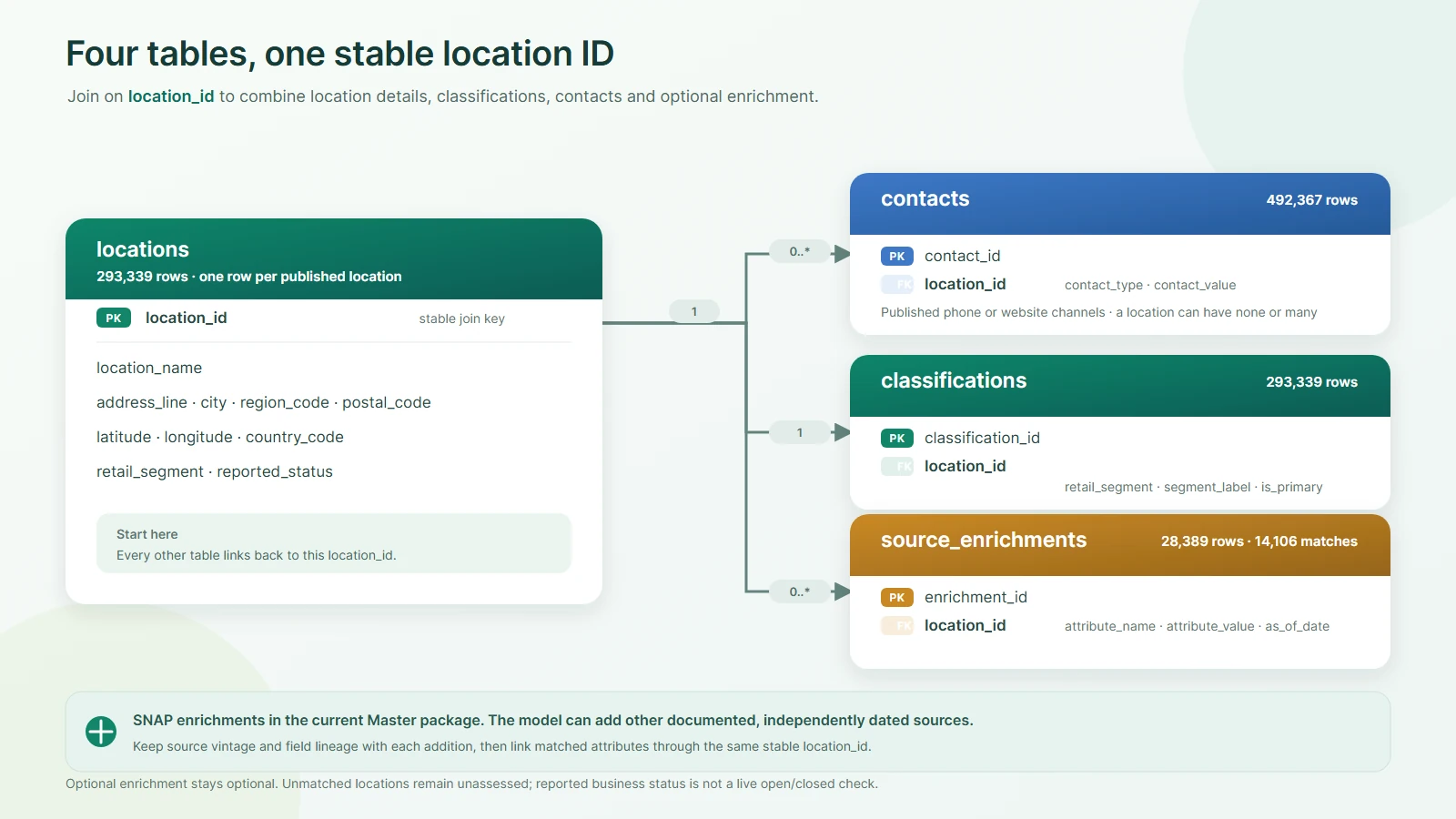
Stable IDs are useful when a team needs to revisit a record, compare a later snapshot, or join the directory to its own work. They do not turn a changing business into a permanent fact. Keep the snapshot date alongside any export, report, or derived table. If a downstream workflow merges in fresh information, retain the source and date of that information as well. That simple practice makes it possible to explain why a field differed from the original release without rewriting history or confusing enrichment with the base directory.
What the optional SNAP match means
The Master package includes 14,106 positive matches to SNAP retailer attributes as of October 7, 2026. These are matches to a separately dated source, not a blanket assessment of every location in the directory. A location without a positive match remains unassessed by that enrichment. It should not be labeled ineligible, inactive, or nonparticipating solely because it does not appear in the match set. Similarly, a positive match should be read with its source date and matching context, not as a promise about a store's status today.
Separating enrichment from the location population leaves room for other independently dated sources later. A user can link them through stable location IDs, document the matching method, and assess conflicts field by field. Adding a new source should not inflate the location count by importing unmatched external rows as if they were part of this release. This structure gives researchers and developers a clear base population and a transparent way to extend it for specific questions.
Formats and working files
The release provides CSV, JSON, and SQLite deliverables, with schemas, field profiles, samples, and source notices. CSV works well for inspection and familiar spreadsheet tools. JSON can be convenient for applications that already process structured objects. SQLite gives analysts and developers a portable relational database that preserves table relationships and supports joins without first loading everything into a hosted database. These formats express the same licensed release in different working forms; choosing a format should follow the user's tools and workflow.
Before importing, review the schema and sample files. Field profiles show what is present in the signed release and help distinguish a genuinely missing value from a blank display. A count of nulls alone can understate missingness when a source also uses empty strings. The published profiles account for both null and blank values. Samples are useful for understanding structure, but they are not a substitute for the full release statistics. A team's validation should compare the chosen format with the expected table count, column names, and documented release version.
Choosing the right license
Usage, Publication, and Master are distinct licensing tiers, each with its own delivery package and rights. Usage is priced at $40, Publication at $80, and Master at $120 for this release. The correct tier depends on what the customer plans to do with the data, especially whether results or the data itself will be distributed. Review the current license terms and package descriptions before ordering. A previous eligible Master owner may see a $10 version-update offer through the account's native upgrade route. That offer is tied to recorded prior-version eligibility and should not be confused with a new Master purchase.
The tier names are a starting point, not a substitute for reading the actual rights. For example, internal analysis, public presentation of selected results, and redistribution of a database are different activities. A customer should choose based on the planned use and the terms shown at checkout. The downloads are protected and connected to the order and entitlement. Keep the order receipt and the delivered version with project records, particularly when a team has purchased several Oddity products or multiple versions over time.
How to use the directory responsibly
Start by defining the question. If the goal is a grocery-only footprint, filter to the core classification first. If the goal includes adjacent food retail, include that group explicitly and report both the combined count and the breakdown. When mapping locations, check whether the available address detail fits the scale of the map and avoid presenting a precise point as verified if the source does not support that precision. For outreach, inspect the contact channel fields and verify the current business and contact before relying on them.
Reported operating status and source confidence are evidence about source records, not independent confirmation that a particular business is open right now. A directory may retain a location while public sources lag behind a closure or relocation. Review records that materially affect a decision, especially where a site visit, delivery route, sales contact, or public claim depends on them. Store the verification date and method in the downstream project rather than silently editing the licensed snapshot. This keeps the original release reproducible.
The same care applies to comparisons with other datasets. A different source can use a broader definition of supermarket, count chains rather than physical sites, omit adjacent retailers, or apply a different date. Reconcile scope, dates, and matching rules before treating a difference as an error. When a report cites this release, name version 2.0.0, the September 23, 2026 directory snapshot, and any separately dated enrichment used in the analysis. That context helps readers understand exactly what a number measures.
Explore the release
The product page presents the tier choices, table statistics, schemas, and sample files. Use those public materials to check fit before purchase. They show the structure and documented coverage while keeping the licensed full files behind the account's protected delivery flow. Customers with an eligible prior Master version should sign in and use the version-update path shown for their account. New customers can select the tier that matches their intended use. The release is a practical starting point for analysis, mapping, and business systems when its scope and dates are carried through the work.
For a concise version guide, see what changed in version 2.0.0 in the Help Center.
Start a useful discussion below. Your contribution will appear after staff review.