





U.S. Veterinarian Practice Locations Database 2.0.0: Six Connected Tables for Practice Research
Veterinary practice research starts with a location, but it rarely ends there. A useful directory needs to show where a practice operates, how a person can reach it, how it is classified, and where it fits within a larger brand. Version 2.0.0 of the U.S. Veterinarian Practice Locations Database puts those related facts into six connected tables. The release centers on 39,007 practice locations, with companion records available in the packages that include them.
The practical advantage of this structure is choice. A project that needs a map or internal territory analysis can start with the locations table. A public directory or client report can add published contact and classification details. A project that needs brand relationships and dated historical contact observations can use the full six-table package. Each option is a distinct set of data and rights, so it is worth matching the package to the work before checkout.
Start with the practice location
The locations table contains 39,007 rows. Each row represents a listed practice location rather than a verified unique legal business. The published fields include names, address components, ZIP codes and coordinates where present. That makes the table a starting point for geographic browsing, regional analysis, and internal lists. It also gives the other tables a stable location_id key to connect to.
Think of the location row as an anchor. If your question is "Which listed practices appear in this area?" you may only need that anchor and the fields in it. If your question involves contact channels or practice categories, the related tables provide more detail without forcing multiple values into one wide location row. When building a map, inspect the sample coordinates and addresses together so your display rules fit the coverage you actually receive.
Choose the package for the work
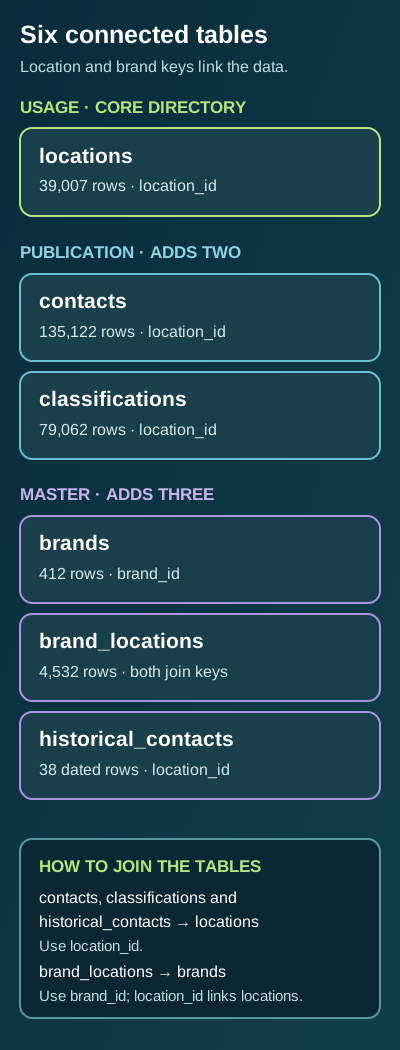
Usage contains the locations table for internal research and analysis. Publication adds 135,122 contact rows and 79,062 classification rows, giving a three-table package for customer-facing sites, apps, reports and client projects under its stated rights. Master includes everything in Publication and adds 412 brand summaries, 4,532 brand-location links and 38 dated historical contact rows. The full package therefore spans all six tables and includes the stated Master client handoff rights.
The counts refer to rows in separate tables, not additional practice locations. For example, several contact rows can connect to one practice, while a brand can connect to more than one location. Adding the table counts together would not produce a meaningful count of unique practices. The product page identifies the exact tables in each package and shows the current prices and rights before purchase. All three packages provide CSV, JSON and SQLite delivery for the tables they include.
How the tables connect
Use location_id to join a location to its contacts, classifications and historical contacts. The brand_locations table connects locations to brands: its location_id points back to the practice, and its brand_id points to a row in brands. These keys matter more than a similar-looking name. A practice name can be abbreviated or shared; an explicit key expresses the relationship supplied by this release.
A typical directory view starts with locations, left-joins contacts and classifications, and decides how to display multiple matching rows. If you flatten a one-to-many join without grouping, a single practice can appear several times. That is expected relational behavior, not evidence that the release contains additional locations. For a brand view, join brand_locations to brands and then to locations. Decide whether your interface is showing locations, brand relationships, or individual contact records, and label the resulting count accordingly.
The 38 historical contact rows are a small, dated companion set. Treat them as historical observations, not as a substitute for the current contact table or as a promise that every practice has contact history. Their value is in preserving a separate time-aware reference where the release has one. If your application depends on current contactability, review the current samples and verify critical records through an appropriate current source before using them operationally.
Questions the structure can answer
For territory planning, select the locations relevant to a state or service area and inspect the supplied address and coordinate fields. For a public practice finder, add the contact and classification tables so visitors can move from a location to the available ways of reaching it and the categories recorded for it. For brand research, follow the two-key bridge in brand_locations and examine how many listed sites connect to each brand. These are examples of how the structure can be used, not claims that every row has every field populated.
The package also supports cleaner updates in a buyer's own system. A contact row, category row or brand relationship can be stored and evaluated separately from the main location record. That reduces the temptation to treat a comma-separated list or repeated columns as the entire data model. CSV is convenient for initial inspection, JSON for application workflows, and SQLite for local relational queries. Choose the format your team can validate and maintain.
Check the current samples and statistics
Before buying, open the product page's table tabs. Each of the six tables has its own schema, row count and published field profile. The sample and preview views let you inspect how the fields are represented and whether the join keys and values suit your use. The statistics view lists distinct and missing counts by field, which is more informative than a single headline number when you are planning filters, imports or outreach rules.
Look especially at fields your project cannot work without. A map needs usable geography; an outreach workflow needs contact channels appropriate to its purpose; a brand analysis needs the bridge between brands and locations. Missing values should shape interface behavior. A blank website, coordinate or classification should not be silently converted into a false fact. Use the schema and samples to decide what your application will show when a field is not supplied.
Coverage also deserves a deliberate read. The 39,007 count is a release total of listed locations, not a complete census of every veterinary practice, and it does not establish that every listing is currently operating. The product page states the release scope and the limitations that matter to a responsible buyer. Those qualifications sit alongside the practical value of having the six tables, formats and relationship keys available for your own analysis.
Build from a clear starting point
If you need only an internal location reference, begin with Usage and validate a sample of the geography you plan to use. If you need a public-facing directory or client output with contact and classification detail, compare Publication's table set and rights. If brand links, dated contact history or Master handoff rights matter to the project, inspect the full six-table package. The product page presents the current package details, exact schema, representative samples and field statistics in one place.
The most useful first step is to identify the question you want to answer, then trace it through the tables and keys. The release provides a structured starting point for veterinary practice location research. Your filters, validation rules and presentation choices turn that starting point into a reliable project.
Start a useful discussion below. Your contribution will appear after staff review.